Category: TECH

  • WIRELESS DOORBELLS

    Many of us already have wireless doorbell cameras (WDBC) which notifiies your cell phone and the builtin door chime that smeone is at your front door.
    However, sometimes you dont hear/see the WDBC cell phone notification, your cell phone is not near you, your cell battery is not charged, your phone is set to DND or may be powered off.

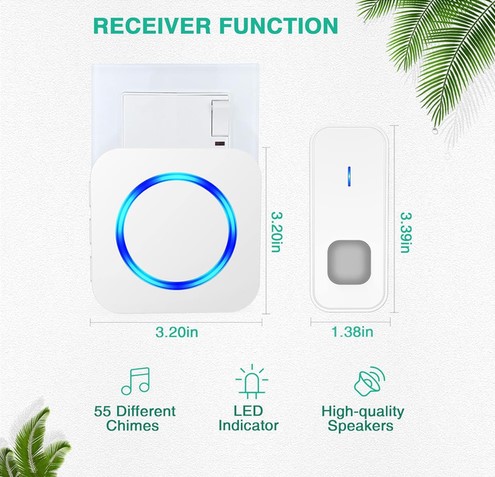
    So, especially for large or multilevel houses, I installed a separate wireless doorbell, which is easily installed by plugging in the receivers (wireless doorbell) into your home’s AC outlets. I installed 1 receiver on each side of our one story house. You could install 1 or more receivers on different levels in a multistorey home. Then attach the doorbell with the included adessive strip on your front door and your done. My wireless doorbell includes 2 receivers (remote electronic doorbells) and 1 wireless doorbell. (about $16 from amazon). The wireless doorbell has adjustable volume and multiple sounds. So, if you are hard of hearing, it’s a bonus.

    No additional setup is necessary unless you want to change the default volume level or tone.

  • TALKING TOUCH BUTTONS BATTERY OPERATED

    #1 USE
    My partner with late stage dementia continues many many times throughout the day to try and escape from his adult day care through the time delayed egress door.
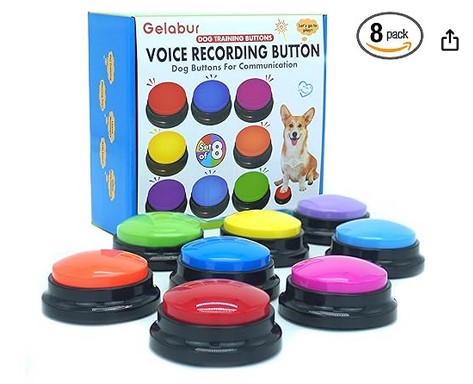
    I’m trying a new deterrent device. I have large touch buttons (battery operated) that you can record up to 30 seconds of your own voice.

    The staff presses the button either on the way to the door or as he has pressed on the door.
    My hope is the redirects him away from the door. i’ve also included a picture of me with the touch button.

    #2 USE
    A second use for this touch buttom maybe if you partner can no longer speaks but can stilll comprehend.

    Example:
    Label the button ‘WATER or DRINK’. record the message “I WOIULD LIKE SOMETHING TO DRINK”

    #3 USE
    Make it an activity for your partner with dementia. take 3 different colored touch buttons.
    Record a dog barking
    Record a cat meowing
    Record a bird chirping
    Have them guess which is which

    You can change the sounds to fit your needs.

    #4 USE
    Record “I LOVE YOU” or another special message and leave one around the house for your partner to hear your voice when you are away.

    These touch buttons are very inexpensive and come in a variety of colors which can work for many purposes. I ordered mine from amazon. Originally, these touch buttons where used to teach dogs to communicate.

  • TEMPORARY DEVICE PASSWORD/PIN TIP

    Periodically, you may have someone help you with your computer, cell phone, or other device, that has a password or PIN. This might be at your home or you may go into a store. If you device has a password or PIN consider temporarily changing, in advance, the password/PIN before they begin working on your device. Do not share your original password or PIN. Of course, that would be if you know how to change your password/PIN. If not contact me. When the person helping you is done, you can change the temporary password/PIN back to the original.one.

  • MICROSOFT OFFICE ALTERNATIVE PROGRAM – NO COST

    Open Source software is created by volunteers throughout the world. There are alternative Open Source programs for many popular commercial (paid) programs. The live solely on donations. I work with a lot of small non profits who don’t have a great deal of money so this is a perfect solution for them.

    The free fully file formats compatible alternative to MS Office is called Libre Office. And it runs on both PC and Mac computers.

    You can download an unlimited fully functioning program at libreoffice.org.
    (Select, Copy, and Paste the above Internet address into your web browser)


    Note: I don’t publish a clickable Internet links to increase security for you when using my Blog.

  • COMPUTER TIPS-USER ACCOUNT TYPES & PARENTAL/DEMENTIA CONTROLS

    This is a basic computer tips document and is not meant to walk you through each procedure.

    COMPUTER TIPS:

    #1 Scammers/Hackers:

    If your partner has dementia and still uses a computer, check to see if their computer user account has been setup as a ‘STANDARD’ type user account and not an ‘ADMIN’ user account.
    This will limit some functions, but adds additional protection against many types of hacker/scammer attacks. This is true for both Microsoft Windows and Apple MAC computers.

    Find a family member or friend who has a some tech knowledge to check the type of user account for you. Or if you know me, contact me, and I can assist you. Your 3rd option is to hire someone. Generally, checking the computer user account type takes just a few minutes.

    #2 Turn Off WiFi:

    If your partner is only interested in playing games, you can turn off WiFi or turn on Airplane Mode, thus there is no Internet access.

    #3 Microsoft Family Accounts:

    (A much more complicated setup proceed)
    Some Examples:
    You can limit the time they can use the computer
    You can receive a weekly activity report of your partner’s computer activates for the week.
    Turn web and search filters on to filter out sites and search results that are too mature/dangerous.
    You can add or block websites manually

    NOTE:
    Be sure and have at least 1 ‘ADMIN’ account on your computer.

  • HOW MANY COMPUTER DATA BACKUPS SHOULD I HAVE?

    MUTIPLE COPIES:
    At least 2 other backups besides the data on your computer

    MUTIPLE EXTERNAL DRIVES:
    1 to an external hard drive/flash drive
    1 to the cloud or another external hard drive/flash drive that is stored offsite

    MUTIPLE LOCATIONS:
    Onsite and Offsite

    GOOGLE:
    In addition, to a free email address, they offer 15 gb of Cloud data storage space for free. And your data can be automatically synced after installing their free Program/App. Also, you can purchase additional storage space for a relatively low monthly cost.

    MICROSOFT:
    In addition, to a free email address, they offer 5 gb of Cloud storage space. And your data can be automatically synced after installing their free Program/App. Also, you can purchase additional storage space for a relatively month cost.

    There many other smaller 3rd party vendors that offer data storage space usually cheaper than the big names above.

  • READING & ‘ANOTHER USE’ FOR THE AMAZON KINDLE

    Of course when we were younger we started at the library reading normal sized print paper books. As my partner got older and his vision decreased, we switched to large print books. Now as his vision has continued to decrease we switched to an amazon kindle where we could increase the font size even larger as well as the contrast. he is almost completely blind in his right eye.

    Another Kindle Purpose:
    At this point, with his advanced dementia, he longer understands the book content and is starting to have problems speaking. So, what I have him do, is verbally read the large font text on the kindle in hopes that this may prolong him speaking correctly. I don’t have any research to back up this idea, but also, this is another activity for him that he actually doesn’t mind.

  • AMAZON ECHO SHOW

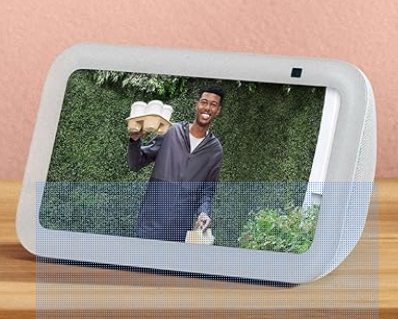
    I use an Amazon Echo Show in our home in addition to a few video surveillance cameras on a separate system. My partner has dementia and can no longer use his cell phone or email.

    What I like about the Echo Show is that I can check in on my partner when I am briefly away from our home using my cell phone. The Echo Show automatically opens a connection (video/audio) when I call him. The video is blurred for about the first 45 seconds, thus giving a person time to cover up if they may not be appropriately dressed. Our Echo Show is placed in our front hallway, away from the bedroom.

    Also, It easily allows other family members to connect to our Echo Show. They can check on not only my partner but me as well. This is something that is not as easily accomplished with video surveillance cameras/system.

    There is no subscription fee for this service. They come in different screen sizes and are reasonably priced on amazon.

    There may be other similar products, by I have not found them at this time.

  • INCREASE CELL PHONE RING TIME

    You can increase the time your cell phone will ring before it goes to your voice mail. It’s not like the old analog telephone which were actual number of rings on the bell inside.

    The following settings are generally supported by most cell phone carrier/vendor system, not changed on your actual cell phone (operating system)). And, generally, will work on Android and iPhone’s as well.

    1st
    Open your phone dialer app
    On your phone’s dial number field enter:
    *#61#
    (Write down your vendor’s voicemail phone number that it displays)
    (This should also tell you how many seconds the ring is currently set for)
    Press your phone’s call button

    2nd
    On your phone’s dial number field enter: **61*voicemailphonenumber**seconds#
    (Enter the number of seconds you want, i think the limit is 30)
    Press the call button
    You should get a message indicating the change

    OR

    Call your cell phone company and have them attempt to make the change on their side or they can walk you through it.

  • LED LIGHTING BASICS – HIGHER CONTRAST

    My partner is almost completely blind in his right eye so contrast is an important factor for him. Following are the 3 most important features of LED light bulbs.

    COLOR TEMPERATURE:
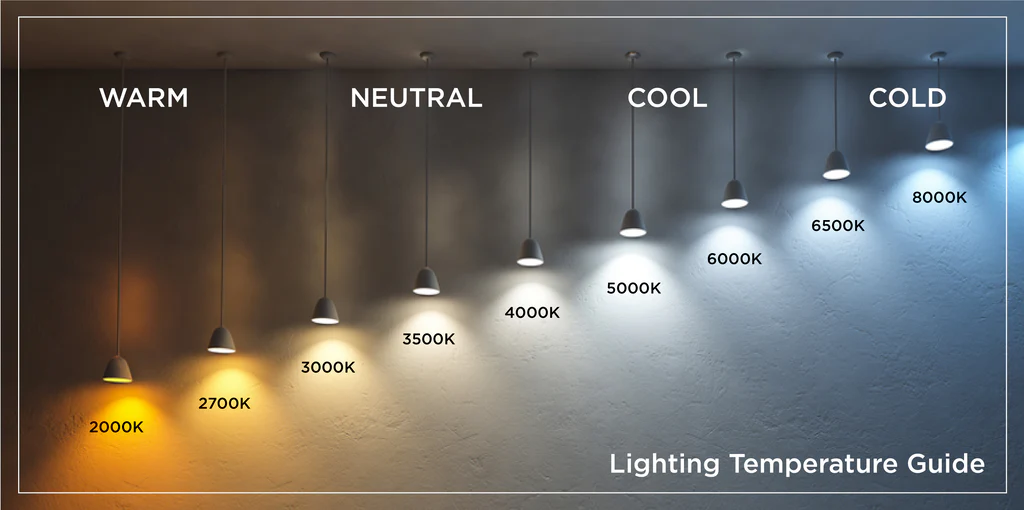
    LED lighting is available in different color temperatures which can help increase contrast.

    3500K – 4000K (K = Kelvin rating) is the best range for higher contrast.

    See the following sample color temperature chart.

    LUMENS:
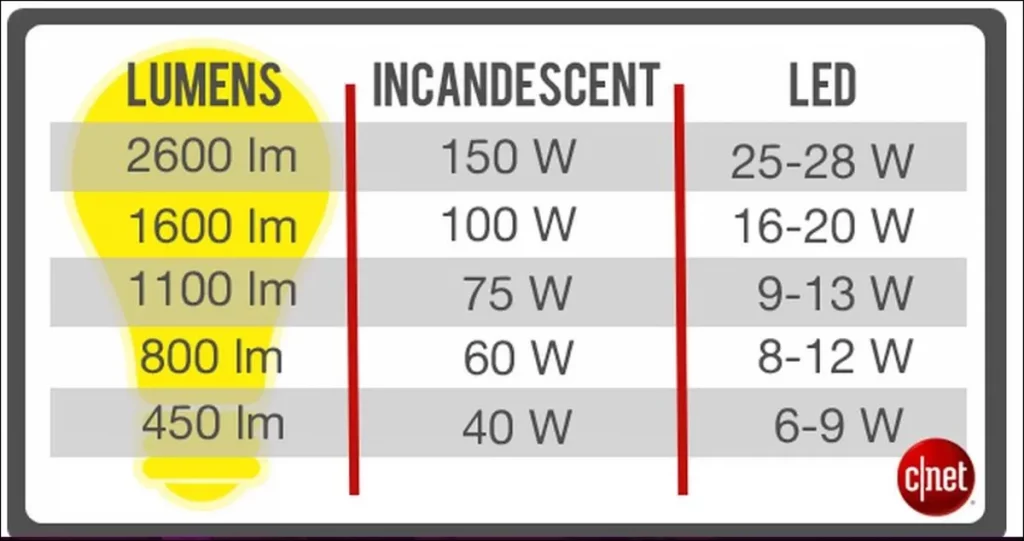
    Older style incandescent light bulbs where rated in WATTS. Today’s LED light bulbs are rated in LUMENS.
    Example: 1600 Lumens = 100 Watt light bulb

    CRI:
    Buy an LED bulb with a higher CRI rating, 90 or higher. It will provide more vivid and true to life colors.

    We use a combination of color temperature LED light bulbs in our house, based on different task areas.